Tap Into Calm is privacy-first EFT tapping online for iPhone, Android, and desktop browsers—no account, no cloud journal, no ads, and no subscription. Start from a feeling, a body sensation, or one of 129 ready-made scenarios across stress, sleep, work, relationships, and more. Your journal, notes, and settings stay on this device; optional journal lock and encrypted backup add another layer when you want it. After your first visit online, add it to your home screen and keep tapping when the connection drops.
On this device only Your journal is never uploaded
Works offline After your first visit
No accountNo ads129 library scenariosJournal stays on-devicePhone, tablet & PCWorks offline as a PWA
Everything essential is free
The guide holds the structure. You stay with the feeling.
You don’t have to memorize meridian order or craft setup language from scratch. The guide names each point on a body map, repeats one short reminder through the round, and asks for a fresh 0–10 rating when you finish so the next round targets what is still there—not a vague “better mood” goal.
New session
From intensity to relief, one step at a time
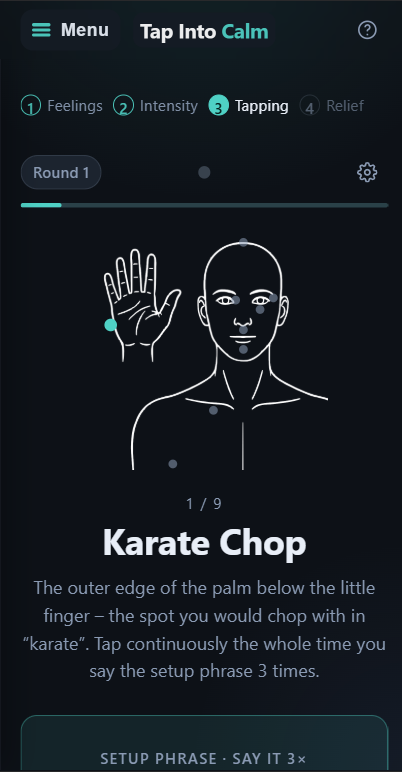
Pick one concrete issue—tight chest before a meeting, not “life is hard.” Rate your SUD score, hear the setup phrase, and tap through karate chop, crown, eyebrow, side of eye, under eye, under nose, chin, collarbone, and under arm. If intensity drops but is not zero, the next round follows the remainder; if it stalls, you name a new aspect.
Even though I have this tension, I deeply and completely accept myself.
129
Ready-made scenarios
Eleven searchable groups—everyday stress, social tension, work, school, sleep, body sensations, money worries, health anxiety, travel, relationships, and self-confidence—each with scripts you can open and tap immediately.
Add Tap Into Calm to your home screen from Chrome, Safari, or Edge. After one connected load, the scenario library, active rounds, journal replays, metronome, and haptic rhythm keep working in airplane mode. AI phrase suggestions still need the network; everything else does not.
A journal that stays yours
Saved sessions live in IndexedDB in this browser—favorites, edits to setup and reminder lines, and optional notes. Replaying a stored round never spends an AI credit, online or offline. In-progress rounds are written to the journal only when you finish. Clear one entry or wipe the whole log in Settings.
Before presentation8 → 3 · 2 rounds−5
Sunday evening6 → 2 · 2 rounds−3
Tension in shoulders5 → 1 · 1 round−4
Voice, rhythm, and tone
Web Speech reads setup and reminder text with a voice and speed you choose—offline voices are preferred when available. Layer a soft tap vibration, metronome click, or optional binaural tone generated in the browser (no audio files downloaded). Experienced users can skip the karate chop after the first round.
One specific issue
Five steps. About one to two minutes.
One issue, five beats, roughly one to two minutes per round. The flow mirrors classic EFT: acknowledge what is true, tap with a steady reminder, then measure again. A help icon in the header opens a glossary, including where each point sits on the body.
STEP 1 OF 5
WHAT ARE YOU FEELING?
Choose one thing that feels present right now.
Tension before tomorrow’s call
Inside each round
Setup phrase, nine points, and honest re-rating
On the karate chop point you repeat the setup three times while intensity stays above zero: “Even though I have this [what is present], I deeply and completely accept myself.” It does not ask you to feel positive about something you do not feel yet. The same short reminder travels with you through the sequence below; when the score finally reaches zero, the session is complete and you can save a note.
Karate chopTop of headBeginning of eyebrowSide of eyeUnder eyeUnder noseChinCollarboneUnder arm
Beyond a standard round, the app also offers a short constricted-breathing exercise and the 9 Gamut procedure—both are kept separate from active sessions so you're never interrupted mid-round. Phrases can be edited before you start or on a saved entry in the journal.
In the browser, on your terms
EFT tapping online without a profile or cloud journal.
Many wellness apps want an email before your first breath. Tap Into Calm opens at tapintocalm.app with nothing to register: no tracking cookies, no in-app analytics, and no ad network. Gumroad handles checkout if you choose AI phrasing; the app never sees your card.
That makes it a practical choice when you want guided meridian tapping on a laptop, tablet, or phone without syncing sensitive notes to a server. Light and dark themes follow your system or your preference. Local reminders—morning, midday, evening, or a custom time—live in this browser; they are not push campaigns from our side.
Free Progress page: session counts, average relief, streaks, and themes from your on-device journal
Optional Session with AI: describe what is happening, get five short phrase options, edit, then tap
Crisis filter on AI requests: harmful wording is blocked and credits are not spent
Privacy is the default, not a toggle buried in settings. Tap Into Calm has no account, profile, or sign-in. Saved rounds, favorites, voice choice, metronome speed, theme, reminders, and your license key after activation sit in this browser’s storage—not a company database.
Optional journal lockOptional in Journal security. Without it, entries stay in this browser and are not uploaded, but they are not encrypted on disk. With the lock on, the journal uses AES-256-GCM on device; unlock with WebAuthn (device biometrics or PIN) or a 10+ character password. Session stats remain hidden until you unlock; your AI balance stays visible.
Encrypted backupExport a JSON file encrypted with a password you choose (PBKDF2 + AES-GCM). Restoring replaces this device’s journal; the file is never uploaded.
No advertising profilesNo ad SDK, no visitor analytics inside the app, and no fingerprinting for marketing.
The only exception is text you choose to send for an AI suggestion.
Only the words you type—situation, optional body cue, optional feeling—and a 0–10 intensity are sent so the service can suggest five brief English phrases. Server security logs hold timing and a hashed network fingerprint, not your sentence. The text is not stored in server logs; it is processed by the language model to return wording you can edit before tapping. Your journal, notes, lock passwords, backup passwords, and history never leave the device. At intensity 4+, setup lines name the problem; softer closing language appears once your rating falls to 3 or below. Harmful wording is blocked before it reaches the model, and no credit is spent.
The free Progress page already summarizes sessions, average relief, streaks, and recurring themes from your local journal. Activating any paid key unlocks the Enhanced Dashboard: richer time ranges, completion rates, biggest single drop, practice calendar, intensity curves before and after rounds, body-area tags, and device tools such as encrypted backup export.
Day, week, month, or year summaries with comparison to the prior period
Practice calendar, round counts, and before/after intensity charts
All figures computed from IndexedDB here—if the journal is locked, session stats wait with it
Optional AI phrasing
One payment. No subscription.
Starter, Regular, and Premium are separate one-time purchases—not tiers that auto-upgrade each other. Every plan unlocks the same Enhanced Dashboard and AI workflow; only the lifetime session pool and daily cap change. Keys do not expire by date.
One-time AI plans (all include the Enhanced Dashboard)
Plan
Price
AI sessions (lifetime)
Daily cap for new sessions
Starter
$1.99 once
50
Up to 10 per day
Regular
$4.99 once
150
Up to 20 per day
Premium
$9.99 once
500
Up to 50 per day
One credit equals one new AI session that returns five wording options you can edit before tapping. Replaying a saved session does not use a credit, even offline and after your pool is empty. Checkout runs on Gumroad; match your order number with the AI usage log in Settings if you ever need support. When credits are gone, library browsing and manual phrasing stay free.
Purchase without an account
From payment to your first AI session in moments
1
Choose a planOne-time, with no automatic renewal.
2
Pay on GumroadGumroad sees your card and email, not the app.
3
Receive your keyImmediately after payment. Save it.
4
Activate it in the appEnter the key and choose Activate.
The digital product is delivered immediately. Once the key is activated, or the first AI credit is used, the purchase is non-refundable. Replaying a saved session does not use a credit and is not itself a first use. A later plan is a new purchase and a new key; it does not upgrade the key you already have.
Original principles of pure EFT
No positive affirmations that skip past what is real.
Positive phrases can merely cover the issue. Tap Into Calm follows the original principles of pure EFT: stay with the uncomfortable emotion until it softens on its own instead of jumping to affirmations that feel false. The setup line names what is here and ends with self-acceptance—not forced optimism.
EFT here is self-help for everyday stress, tension, and uncomfortable overload—not diagnosis or treatment. For trauma, severe symptoms, or thoughts of self-harm, seek professional care; in crisis, see findahelpline.com or your local emergency number (112 in much of Europe, 911 in the US and Canada, 999 in the UK).
Tap Into Calm is built by David Zelenka. Didn’t find your answer? Write to info@tapintocalm.app.
Do I need an account?
No. Open the app and begin. There is nothing to register, and the app does not ask for your email. A license key is stored locally after purchase—it is not a user profile.
Do I need to be online?
After your first visit while connected, the guide, library, journal, metronome, vibration, and offline-capable voice work without a network. Only optional AI phrase suggestions and license verification need the internet. If a suggestion fails offline, type phrases yourself—the rest of the round does not require AI.
Where are my sessions stored?
In IndexedDB for this browser on this device—not in a cloud account. Without the optional lock, entries stay local, are not uploaded, and are not encrypted on disk. Turn on journal security for AES-256-GCM, or export an encrypted backup file you control.
What is EFT tapping?
Emotional Freedom Techniques combine focused attention on one specific feeling or situation with gentle tapping on nine acupressure points. You rate intensity (often called SUD) before and after each round. Tap Into Calm keeps the structure so you can stay with the sensation instead of managing steps from memory.
Can I install it on my phone?
Yes—use your browser’s “Add to Home Screen” or install prompt after loading the app once online. It behaves like a lightweight PWA: full-screen, icon on your launcher, and offline library access. Reminders use browser notifications while the app or tab can run; delivery is not guaranteed if the browser is fully closed unless it supports scheduled notifications.
What stays free?
The guided round, 129 scenarios, voice and rhythm tools, journal, basic Progress stats, themes, and local reminders. Paid keys only add AI wording credits and the Enhanced Dashboard—all three plans include the same dashboard features.
What exactly leaves the device when I use AI?
Only the description you write—optionally including feelings and a place in the body—and an intensity from 0–10. That text is not stored in server logs; it is sent to suggest phrases and processed by the language model. Your journal, notes, lock passwords, backup passwords, and history are not sent.
What happens when my AI sessions run out?
New AI suggestions stop. You can keep replaying saved sessions without using a credit. The library, journal, and tapping without AI remain free.
Can I move to a higher plan later?
Yes, as a new one-time purchase. A higher plan does not replace your previous key; you activate the new key on your device.
Will you refund a purchase?
No, once the key is activated or the first AI credit is used, whichever happens first. Delivery is immediate, and each new session costs a model run. Replaying a saved session does not use a credit and is not itself a first use.
Is Tap Into Calm treatment?
No. It is a self-help guide for everyday stress, tension, and discomfort. It does not replace a physician, psychotherapist, or crisis support. EFT tapping is not a medical device in this context.
Does the app track me with cookies?
No analytics or ad cookies run inside Tap Into Calm. This marketing site at tapintocalm.com is separate static HTML; the app itself does not build an advertising profile from your sessions.
Can I share my license key?
Keys are meant for your devices. You may re-enter the same key after reinstalling or on another browser you own. Use Remove key on a shared computer so the next person does not spend your AI credits. Sharing keys publicly may hit rate limits.
You can start your first session now
What needs your attention right now?
No registration, no card, and no subscription wall for the core guide. Open the app, name one specific issue, rate it honestly, and let the sequence carry you through the nine points. Add it to your home screen when you are ready to practice away from Wi‑Fi.